> For the complete documentation index, see [llms.txt](https://docs.pd4ml.com/llms.txt). Markdown versions of documentation pages are available by appending `.md` to page URLs; this page is available as [Markdown](https://docs.pd4ml.com/features/pd4ml-integrations/using-pd4ml-with-zend-framework-2-zf2.md).
# Using PD4ML with Zend Framework 2 (ZF2)
This walkthrough adds a "Page as PDF" button to a Zend Framework 2 view, using the Zend Framework tutorial's own **Albums** sample application as the base. It builds directly on the [PHP Wrapper](/features/pd4ml-integrations/php-wrapper.md) pattern -- shelling out to the `Pd4Cmd` command-line tool from a small PHP script -- so it's worth reading that page first if the general approach is unfamiliar.
{% hint style="info" %}
This page was checked against the current PD4ML source before republishing, not just carried over. The Zend Framework 2 side of the walkthrough (the controller action, the view template, the module config) is unchanged, since none of that depends on PD4ML internals. What did need correcting is the `Pd4Cmd` invocation itself:
The original sample invokes it as `java ... -cp $jar Pd4Cmd ...` -- a bare, unqualified `Pd4Cmd` class name. That hasn't resolved for some time: `Pd4Cmd` lives in the `com.pd4ml.tools` package, not the default package, so a plain classpath launch needs the fully-qualified name. The packaged jar's manifest already declares `com.pd4ml.tools.Pd4Cmd` as its `Main-Class`, so the simplest fix -- and the form PD4ML's own command-line reference documents -- is to drop `-cp`/the class name entirely and launch the jar directly with `-jar`. Both PHP scripts below use the corrected form.
{% endhint %}
## Prerequisites
Follow the [Zend Framework 2 tutorial](http://framework.zend.com/manual/2.0/en/user-guide/overview.html) far enough to get the **Albums** demo application running.
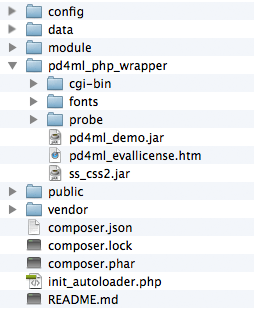
Then set up PD4ML's PHP wrapper against that application, as described in [PHP Wrapper](/features/pd4ml-integrations/php-wrapper.md): download the wrapper package, unpack it into the application root, confirm a Java runtime is reachable from PHP, and run the bundled environment probe script to confirm everything is wired up. The unpacked wrapper should sit alongside the ZF2 application like this:
## Adding a "Page as PDF" button to a view
The example adds a "Page as PDF" button to the album list. As a feature this is mostly illustrative -- in a real deployment, you'd typically point the PD4ML converter directly at a known, print-optimized report or invoice URL rather than working out the current page's URL through an HTTP referrer, as this example does for generality.
**1. Add a PDF-generation link to the album list view**, `module/Album/view/album/album/index.phtml`:
```html
...
| |
|
Page as PDF
|
```
(The added section sits between the `edit begin`/`edit end` comments.) The `pd4ml-display: none` style hides the link itself from the generated PDF -- confirmed still supported in the current PD4ML CSS engine -- since a self-referential "convert to PDF" link makes no sense inside its own PDF output.
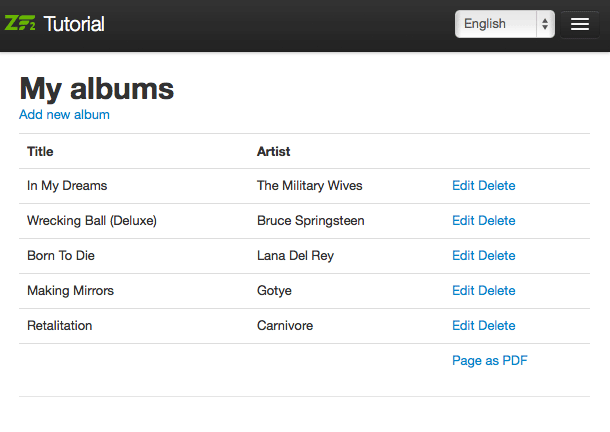
With the link in place, the album list looks like this, pointing at a new, not-yet-handled `pdf` action:
**2. Add the `pdf` action handler** to `module/Album/src/Album/Controller/AlbumController.php`:
```php
public function pdfAction()
{
$url = $this->getRequest()->getHeader('Referer')->getUri();
$enc = base64_encode($url);
$this->redirect()->toUrl($this->getRequest()->getBaseUrl() . '/pd4ml.php?url=' . $enc);
}
```
The handler reads the referring page's URL -- the album list, in this case -- and forwards it to the converter script as a `url` parameter, base64-encoding it to sidestep any issues with special characters.
**3. Create the converter script**, `public/pd4ml.php`, which the redirect above targets:
```php
```
Make sure there's no whitespace before ``.
The script decodes the `url` parameter, converts that URL to a PDF via `Pd4Cmd`, and streams the resulting bytes back as the HTTP response. It also appends a `?layout=pdf` parameter to the URL before conversion, which the next step uses to signal the application to switch to a PDF-optimized layout.
**4. Add a PDF-optimized layout template.** The [original album list view](#adding-a-page-as-pdf-button-to-a-view) includes a navigation bar, which belongs in an interactive web page but adds nothing useful to a printed/PDF document. Copy `module/Application/view/layout/layout.phtml` to `blank.phtml` in the same directory, and strip the navigation bar out:
```html
doctype(); ?>
headTitle('ZF2 '. $this->translate('Skeleton Application'))->setSeparator(' - ')->setAutoEscape(false) ?>
headMeta()->appendName('viewport', 'width=device-width, initial-scale=1.0') ?>
headLink(array('rel' => 'shortcut icon', 'type' => 'image/vnd.microsoft.icon', 'href' => $this->basePath() . '/images/favicon.ico'))
->appendStylesheet($this->basePath() . '/css/bootstrap.min.css')
->appendStylesheet($this->basePath() . '/css/style.css')
->appendStylesheet($this->basePath() . '/css/bootstrap-responsive.min.css') ?>
headScript()->appendFile($this->basePath() . '/js/html5.js', 'text/javascript', array('conditional' => 'lt IE 9',))
->appendFile($this->basePath() . '/js/jquery-1.7.2.min.js') ?>
content; ?>
```
**5. Register the new template** in `module/Album/config/module.config.php`:
```js
'view_manager' => array(
'template_path_stack' => array(
'album' => __DIR__ . '/../view',
),
),
// edit begin
'template_map' => array(
'layout/blank' => __DIR__ . '/../view/layout/blank.phtml',
),
// edit end
```
**6. Switch templates based on the `layout` query parameter**, in `module/Album/src/Album/Controller/AlbumController.php`'s `index` action:
```js
public function indexAction()
{
// edit begin
$flag = $this->params()->fromQuery('layout');
if ('pdf' == $flag) {
$layout = $this->layout();
$layout->setTemplate('layout/blank');
}
// edit end
return new ViewModel(array(
'albums' => $this->getAlbumTable()->fetchAll(),
));
}
```
With all six steps in place, clicking "Page as PDF" produces a navigation-free PDF like [this example result](http://old.pd4ml.com/i/zend/pd4ml.php.pdf).
The complete application structure (excluding the PD4ML PHP wrapper itself, which is covered separately in [PHP Wrapper](/features/pd4ml-integrations/php-wrapper.md)) is available as a [downloadable archive](http://old.pd4ml.com/i/zend/zf2.zip). Remember to adjust the database credentials in `config/autoload/local.php` before running it.
## See also
* [PHP Wrapper](/features/pd4ml-integrations/php-wrapper.md) -- the general PD4ML-from-PHP pattern this walkthrough builds on, including deployment and troubleshooting notes.
* [Pd4Cmd Command-Line Reference](/pd4cmd-command-line-reference.md) -- the full, current flag reference for the `Pd4Cmd` invocation used by `pd4ml.php` above.
---
# Agent Instructions
This documentation is published with GitBook. GitBook is the documentation platform designed so that both humans and AI agents can read, navigate, and reason over technical content effectively. Learn more at gitbook.com.
## Querying This Documentation
If you need additional information that is not directly available in this page, you can query the documentation dynamically by asking a question.
Perform an HTTP GET request on the current page URL with the `ask` query parameter, and the optional `goal` query parameter:
```
GET https://docs.pd4ml.com/features/pd4ml-integrations/using-pd4ml-with-zend-framework-2-zf2.md?ask=&goal=
```
`ask` is the immediate question: it should be specific, self-contained, and written in natural language.
`goal` is optional and describes the broader end goal you are ultimately trying to accomplish on behalf of the user. GitBook uses it to tailor the answer towards what is most useful for that goal.
The response will contain a direct answer to the question and relevant excerpts and sources from the documentation.
Use this mechanism when the answer is not explicitly present in the current page, you need clarification or additional context, or you want to retrieve related documentation sections.